Proxmox セットアップ
-
N100ミニPC(8GB/512GB)を18kで買った
-
Prepare Installation Media - Proxmox VE みてインストールした
dd bs=1M conv=fdatasync if=./proxmox-ve_*.iso of=/dev/sda- IPv4/CIDR: 192.168.11.10/24
- Gateway: 192.168.11.11
- FQDN:
pve.local - Web UI: https://192.168.11.10:8006
-
ルーターの設定を確認 http://192.168.11.1/
- subnet: 192.168.11.0/24 (CIDR表記)
-
network周りどうなっているの?
- https://yoshi0808.github.io/new-technology/2024/02/19/Proxmox-new-vm/
- enp3s0が物理ネットワークインターフェイス
- vmbr0がLinux bridge
- https://pve.proxmox.com/wiki/Network_Configuration
- DNS serverを127.0.0.1から8.8.8.8に変更したらnslookupが通るように
- https://yoshi0808.github.io/new-technology/2024/02/19/Proxmox-new-vm/
-
OSイメージの用意
-
ルーターの設定を確認 http://192.168.11.1/
- subnet: 192.168.11.0/24 (CIDR表記)
VMを作成してk8s clusterセットアップ
https://www.tunamaguro.dev/articles/move-home-kubernetes-to-proxmox/
ベースのVMを作成
os=ubuntu 22.04.4,name=base,cores=1, sockets=2, RAM=4GB
- Network connections > DHCP
- server: k8s-control-1, user: ubuntu, pass: password
- CRI-O v1.27
# (base)
sudo apt update
sudo apt upgrade -y

# https://kubernetes.io/ja/docs/setup/production-environment/container-runtimes/
cat <<EOF | sudo tee /etc/modules-load.d/k8s.conf
overlay
br_netfilter
EOF

sudo modprobe overlay
sudo modprobe br_netfilter

# この構成に必要なカーネルパラメーター、再起動しても値は永続します
cat <<EOF | sudo tee /etc/sysctl.d/k8s.conf
net.bridge.bridge-nf-call-iptables  = 1
net.bridge.bridge-nf-call-ip6tables = 1
net.ipv4.ip_forward                 = 1
EOF

# 再起動せずにカーネルパラメーターを適用
sudo sysctl --system

lsmod | grep br_netfilter
lsmod | grep overlay

# https://kubernetes.io/ja/docs/setup/production-environment/tools/kubeadm/install-kubeadm/

sudo vim /etc/fstab # /swap.imgをコメントアウトする
sudo swapoff -a

free -h # Swapが0か?

sudo apt-get update
sudo apt-get install -y apt-transport-https ca-certificates curl

curl -fsSL https://pkgs.k8s.io/core:/stable:/v1.29/deb/Release.key | sudo gpg --dearmor -o /etc/apt/keyrings/kubernetes-apt-keyring.gpg
echo 'deb [signed-by=/etc/apt/keyrings/kubernetes-apt-keyring.gpg] https://pkgs.k8s.io/core:/stable:/v1.29/deb/ /' | sudo tee /etc/apt/sources.list.d/kubernetes.list

sudo apt-get update
sudo apt-get install -y kubelet kubeadm kubectl
sudo apt-mark hold kubelet kubeadm kubectl

# https://github.com/cri-o/cri-o/blob/main/install.md#debian-bullseye-or-higher---ubuntu-2004-or-higher

sudo su
# このバージョンは以下を参照して任意のものに変えてください
# https://cri-o.github.io/cri-o/
export VERSION=1.27
# https://github.com/cri-o/cri-o/blob/main/install.md#apt-based-operating-systems
export OS=xUbuntu_22.04

echo "deb [signed-by=/usr/share/keyrings/libcontainers-archive-keyring.gpg] https://download.opensuse.org/repositories/devel:/kubic:/libcontainers:/stable/$OS/ /" > /etc/apt/sources.list.d/devel:kubic:libcontainers:stable.list
echo "deb [signed-by=/usr/share/keyrings/libcontainers-crio-archive-keyring.gpg] https://download.opensuse.org/repositories/devel:/kubic:/libcontainers:/stable:/cri-o:/$VERSION/$OS/ /" > /etc/apt/sources.list.d/devel:kubic:libcontainers:stable:cri-o:$VERSION.list

mkdir -p /usr/share/keyrings
curl -L https://download.opensuse.org/repositories/devel:/kubic:/libcontainers:/stable/$OS/Release.key | gpg --dearmor -o /usr/share/keyrings/libcontainers-archive-keyring.gpg
curl -L https://download.opensuse.org/repositories/devel:/kubic:/libcontainers:/stable:/cri-o:/$VERSION/$OS/Release.key | gpg --dearmor -o /usr/share/keyrings/libcontainers-crio-archive-keyring.gpg

apt-get update
apt-get install cri-o cri-o-runc

rm -rf /etc/cni/net.d/*

sudo systemctl daemon-reload
sudo systemctl enable crio
sudo systemctl start crio

crictl info # RuntimeReady.status=trueか?
各VMの設定
各VMに入り ip a でアドレス確認してsshで作業
k8s-control-1: `192.168.11.24k8s-node-1: `192.168.11.25k8s-node-2: `192.168.11.26k8s-node-2: `192.168.11.27
# This is the network config written by 'subiquity'
network:
  ethernets:
    ens18:
      dhcp4: false
      addresses:
        - 192.168.11.24/24
      routes:
        - to: default
          via: 192.168.11.1
      nameservers:
        addresses:
          - 192.168.11.1
version: 2- コントロールプレーンの初期化
# (k8s-control-1)
$ sudo kubeadm init \
  --apiserver-advertise-address=192.168.11.24 \
  --pod-network-cidr=192.168.1.0/24

...

kubeadm join 192.168.11.24:6443 \
  --token xcotmj.j6efi4p1ezu33qki \
  --discovery-token-ca-cert-hash sha256:ccdf5ea49119654fa918d5cb0a1581238d8a3976471f702a4730a942276ce325

$ mkdir -p $HOME/.kube
$ sudo cp -i /etc/kubernetes/admin.conf $HOME/.kube/config
$ sudo chown $(id -u):$(id -g) $HOME/.kube/config
# (k8s-node-*)
$ sudo kubeadm join 192.168.11.24:6443 \
--token xcotmj.j6efi4p1ezu33qki \
--discovery-token-ca-cert-hash sha256:ccdf5ea49119654fa918d5cb0a1581238d8a3976471f702a4730a942276ce325
This node has joined the cluster- ホストにkubeadmインストール https://kubernetes.io/ja/docs/setup/production-environment/tools/kubeadm/install-kubeadm/
# (host)
sudo apt-get install -y apt-transport-https ca-certificates curl gpg
curl -fsSL https://pkgs.k8s.io/core:/stable:/v1.30/deb/Release.key | sudo gpg --dearmor -o /etc/apt/keyrings/kubernetes-apt-keyring.gpg
echo 'deb [signed-by=/etc/apt/keyrings/kubernetes-apt-keyring.gpg] https://pkgs.k8s.io/core:/stable:/v1.30/deb/ /' | sudo tee /etc/apt/sources.list.d/kubernetes.list
sudo apt-get update
sudo apt-get install -y kubelet kubeadm kubectl
sudo apt-mark hold kubelet kubeadm kubectl

kubectl version
Client Version: v1.30.0
Kustomize Version: v5.0.4-0.20230601165947-6ce0bf390ce3

kubeadm version
kubeadm version: &version.Info{Major:"1", Minor:"30", GitVersion:"v1.30.0", GitCommit:"7c48c2bd72b9bf5c44d21d7338cc7bea77d0ad2a", GitTreeState:"clean", BuildDate:"2024-04-17T17:34:08Z", GoVersion:"go1.22.2", Compiler:"gc", Platform:"linux/amd64"}
# (k8s-control-1)
$ kubectl get node
NAME STATUS ROLES AGE VERSION
k8s-control-1 NotReady control-plane 4m4s v1.29.4
k8s-node-1 NotReady <none> 73s v1.29.4
k8s-node-2 NotReady <none> 30s v1.29.4
k8s-node-3 NotReady <none> 10s v1.29.4- Calico(Pod間の通信を管理するCNI) インストール
# (k8s-control-1)
$ kubectl create -f https://raw.githubusercontent.com/projectcalico/calico/v3.26.1/manifests/tigera-operator.yaml
$ curl https://raw.githubusercontent.com/projectcalico/calico/v3.26.1/manifests/custom-resources.yaml -O
$ vim custom-resources.yaml # spec.calicoNetwork.ipPools.cidr=192.168.1.0/24に
$ kubectl create -f custom-resources.yaml
$ watch kubectl get -A all- 動作チェック
# (host)
$ scp ubuntu@192.168.11.24:~/.kube/config ~/.kube/config

$ kubectl config get-contexts
CURRENT   NAME                          CLUSTER      AUTHINFO           NAMESPACE
*         kubernetes-admin@kubernetes   kubernetes   kubernetes-admin

$ kubectl config use-context kubernetes-admin@kubernetes
Switched to context "kubernetes-admin@kubernetes".

$ kubectl get nodes- nginxのdeploymentを作って動作確認
kubectl apply -f sample-deploy.yaml- `kubectl port-forward services/nginx-service 8991:80
open http://localhost:8991でページが表示された- `kubectl delete -f sample-deploy.yaml
k8sダッシュボード有効化
- Web UI (Dashboard) | Kubernetes
- dashboard/docs/user/access-control/creating-sample-user.md at master · kubernetes/dashboard · GitHub
# (host)
# 1. deploy dashboard
$ kubectl apply -f https://raw.githubusercontent.com/kubernetes/dashboard/v2.0.0/aio/deploy/recommended.yaml

# 2. create service account
$ code dashboard-adminuser.yaml

apiVersion: v1
kind: ServiceAccount
metadata:
  name: admin-user
  namespace: kubernetes-dashboard

$ kubectl apply -f dashboard-adminuser.yaml

$ code dashboard-adminuser.yaml

apiVersion: rbac.authorization.k8s.io/v1
kind: ClusterRoleBinding
metadata:
  name: admin-user
roleRef:
  apiGroup: rbac.authorization.k8s.io
  kind: ClusterRole
  name: cluster-admin
subjects:
  - kind: ServiceAccount
    name: admin-user
    namespace: kubernetes-dashboard

$ kubectl apply -f dashboard-adminuser.yaml

# copy token
$ kubectl -n kubernetes-dashboard create token admin-user | xsel -bi

# 3. open dashboard
$ kubectl proxy
Starting to serve on 127.0.0.1:8001

$ open http://localhost:8001/api/v1/namespaces/kubernetes-dashboard/services/https:kubernetes-dashboard:/proxy/#/login

# list notes
# http://localhost:8001/api/v1/namespaces/kubernetes-dashboard/services/https:kubernetes-dashboard:/proxy/#/node?namespace=default

# 4. delete service account
$ kubectl -n kubernetes-dashboard delete serviceaccount admin-user
$ kubectl -n kubernetes-dashboard delete clusterrolebinding admin-user

# 5. delete dashboard
$ kubectl delete -f https://raw.githubusercontent.com/kubernetes/dashboard/v2.0.0/aio/deploy/recommended.yaml
コンテナをデプロイするには
-
参考
-
DockerHubにrepository作成後,
docker build --no-cache -t wakametech/python-fastapi:v1 .

docker login
docker push wakametech/python-fastapi:v1
kubectl apply -f ./k8s/python-fastapi.yaml- ingress
- helmインストール https://helm.sh/docs/intro/install/
helm repo add ingress-nginx https://kubernetes.github.io/ingress-nginx
helm install ingress-nginx ingress-nginx/ingress-nginx

kubectl get services

helm uninstall ingress-nginx- LoadBalancerが
<pending>のまま- nginx - Kubernetes service external ip pending - Stack Overflow
- Custom clusterでは TYPE=LoadBalancer使えないらしい. Ingress Controllerを使えとのこと
- Kubernetes の Service type LoadBalancer を手作業で作る kubernetes - Qiita で無理やり使うことは出来るらしい
- Ingress ControllerでLBする
kubectl apply -f https://raw.githubusercontent.com/traefik/traefik/v1.7/examples/k8s/traefik-deployment.yaml
kubectl apply -f https://raw.githubusercontent.com/traefik/traefik/v1.7/examples/k8s/traefik-ds.yaml

code k8s/example-ingress.yaml
kubectl apply -f k8s/example-ingress.yaml
kubectl get ingress -w # ADDRESSを確認- kubectl
apply -f- `delete -f
- Helm
- k8sのパッケージマネージャ
- パッケージはchartという. ディレクトリ構成
- mychart/
- Chart.yaml
- values.yaml
- charts/
- templates/
- mychart/
- 変数管理
- mychart/values.yamlに
hoge: fugaと書けば - template内で
{{ .Values.hoge }}と使用できる - helm install時に展開される(
--set hoge=fugaと直接指定も可能) - 環境毎に値を用意すれば簡単にdeploy出来る
- mychart/values.yamlに
- Kustomize
- マニフェストファイルの共通化が出来る
- 共通manifest(base)と差分(overlays)を書けば環境ごとのマニフェストファイルを生成してくれる
- Skaffold
- skaffold のメモ - ngyukiの日記
-
本番環境がk8sでもローカル開発時はdocker composeの方が良い
-
skaffold devで(ホットリロードで更新イメージデプロイ)- Dockerfileをビルド,
my-app:<has>とタグ付け - マニフェストのイメージが更新, metadata.labelsが付与
- kubectl apply
- ポートフォワーディング
- Dockerfileをビルド,
- skaffold のメモ - ngyukiの日記
Antikythera instance
git clone https://github.com/access-company/antikythera.git
git clone https://github.com/access-company/antikythera_instance_example.git
git clone https://github.com/access-company/testgear.git

cd antikythera_instance_example
vim mix.exs # [git: "/home/kmt/Documents/antikythera" に
mix deps.get && mix deps.get && mix compile

cd ../testgear
export ANTIKYTHERA_INSTANCE_DEP='{:antikythera_instance_example, [git: "/home/kmt/Documents/antikythera_instance_example"]}'

unlink .tool-versions
cp ../antikythera/.tool-versions .

mix deps.get && mix deps.get

sudo vim /etc/hosts # 127.0.0.1 testgear.localhost
iex -S mix

2024-04-27T05:55:13.693+00:00 [error] module=FileSystem.Backends.FSInotify `inotify-tools` is needed to run `file_system` for your system, check https://github.com/rvoicilas/inotify-tools/wiki for more information about how to install it. If it's already installed but not be found, appoint executable file with `config.exs` or `FILESYSTEM_FSINOTIFY_EXECUTABLE_FILE` env.- https://github.com/inotify-tools/inotify-tools/wiki
apt-get install inotify-tools
docker pull rtvu/docker-elixir
docker build rtvu/docker-elixir --build-arg ERLANG_VERSION=24.3.4.13 --build-arg ELIXIR_VERSION=1.13.4-otp-24- elixir 1.13の環境を作る
- デバッグ
- ベースイメージを作ったあと
dc run <container> shで中に入ってインクリメンタルにDockerfileを作る dc build --progress=plainで出力を確認
- ベースイメージを作ったあと
- 検討
- rtvu/docker-elixir
ARG(docker-composeでは<container>.build.argsで渡す)で外部からビルド時にバージョン指定出来ない?
- vborja/asdf-ubuntu
- asdfユーザーとしてasdfをインストールしている, のでrootとasdfを切り替えながら環境構築する
- rtvu/docker-elixir
- Erlang
- Before asdf install が必要,
DEBIAN_FRONTEND=noninteractiveを指定しないと止まるので注意
- Before asdf install が必要,
- Elixir`
- hex, rebar導入
- イメージをDocker Hubにプッシュ
docker build --tag=wakametech/asdf-erlang-elixir:latest ./docker/ --build-arg ERLANG_VERSION=24.3.4.13 --build-arg ELIXIR_VERSION=1.13.4-otp-24docker push wakametech/asdf-erlang-elixir:latest
- デバッグ
FROM vborja/asdf-ubuntu:latest

ARG ERLANG_VERSION
ARG ELIXIR_VERSION

USER root

# https://github.com/asdf-vm/asdf-erlang#before-asdf-install
RUN \
    apt-get update && \
    DEBIAN_FRONTEND=noninteractive apt-get install -y \
    build-essential \
    autoconf \
    m4 \
    libncurses5-dev \
    libwxgtk3.0-gtk3-dev \
    libwxgtk-webview3.0-gtk3-dev \
    libgl1-mesa-dev \
    libglu1-mesa-dev \
    libpng-dev \
    libssh-dev \
    unixodbc-dev \
    xsltproc \
    fop \
    libxml2-utils \
    libncurses-dev

USER asdf

RUN asdf plugin-add erlang https://github.com/asdf-vm/asdf-erlang.git
RUN export KERL_CONFIGURE_OPTIONS="--without-javac"
ENV ERLANG_VERSION $ERLANG_VERSION

RUN asdf install erlang $ERLANG_VERSION
RUN asdf global erlang $ERLANG_VERSION

RUN asdf plugin-add elixir https://github.com/asdf-vm/asdf-elixir.git
ENV ELIXIR_VERSION $ELIXIR_VERSION
RUN asdf install elixir $ELIXIR_VERSION
RUN asdf global elixir $ELIXIR_VERSION

RUN mix local.hex --force && mix local.rebar --force- a9aのコンテナ化
wakametech/asdf-erlang-elixir:latestを使ってappコンテナ作成- Dockerfile を書いた
- ビルド時に必要な依存
inotify-toolslibexpat1-dev: fast_xmlのために必要らしい expat package
- リリースの作成
- 1からリリースを作るのは大変そう & 理解していないので
AntikytheraLocal.RunningEnvironmentを使い回すmix antikythera_local.start <gears>でa9a本体の起動とgearの配置- たまにスペックの問題?で
wait_until_directories_are_created()が失敗する - daemonで起動するのでコンテナが終了しないように
tty: trueにしておく
deps/antikythera/tmp/local/release_per_nodeがリリースディレクトリになる- ログ確認
tail -f deps/antikythera/tmp/local/release_per_node/tmp/log/erlang.log.1
- ログ確認
- 1からリリースを作るのは大変そう & 理解していないので
- 起動スクリプト
- a9a_k8sをclone, ビルド, gearをclone, ビルド
http://localhost:8082/healthcheck(=>:8080) が返ってくるようになりました
git clone -b feature/dockerize https://github.com/wakame-tech/antikythera_k8s.git .
mix deps.get && mix deps.get

export ANTIKYTHERA_INSTANCE_DEP="{:antikythera_k8s, [github: \"wakame-tech/antikythera_k8s\"]}"
mkdir gears
git clone https://github.com/access-company/testgear.git- remote_consoleに接続できない
AntikytheraLocal.NodeName.get()はantikythera@$(hostname -f).local- ドットが含まれている時は
.localをつけない - ホスト名はドットが含まれていなければならない
** System running to use fully qualified hostnames **** Hostname antikythera-k8s-b9cdc79dd-dgzf6 is illegal **
- ドットが含まれている時は
hostname -f は3820709c2d5a (コンテナID) でドットが含まれていない- -> compose.yamlに
services.app.hostname=a9a-k8s.localを設定
- -> compose.yamlに
MIX_ENV=prod \
RELEASE_NODE="antikythera@$(hostname -f)" \
RELEASE_COOKIE="local" \
rel_local_erlang-24/antikythera_k8s/bin/antikythera_k8s remote
`
docker-composeでerlangクラスターを作る
-
3台からなるerlangクラスターをdocker-composeで作ってみます
- ホスト名:
antikythera-k8s-{1,2,3}.local - IPアドレス: 192.168.100.{11,12,13}
- ホスト名:
-
IPアドレスの固定は
<service>.networks.<network>.ipv4_addressで,extra_hostsを書くとコンテナ内の/etc/hostsに追加されるらしいです
services:
  app1:
    hostname: antikythera-k8s-1.local
    networks:
      app_net:
        ipv4_address: 192.168.100.11
    extra_hosts:
      - "antikythera-k8s-2.local:192.168.100.12"
      - "antikythera-k8s-3.local:192.168.100.13"
  app2:
    hostname: antikythera-k8s-2.local
    networks:
      app_net:
        ipv4_address: 192.168.100.12
    extra_hosts:
      - "antikythera-k8s-1.local:192.168.100.11"
      - "antikythera-k8s-3.local:192.168.100.13"
  app3:
    hostname: antikythera-k8s-3.local
    networks:
      app_net:
        ipv4_address: 192.168.100.13
    extra_hosts:
      - "antikythera-k8s-1.local:192.168.100.11"
      - "antikythera-k8s-2.local:192.168.100.12"
networks:
  app_net:
    driver: bridge
    ipam:
      driver: default
      config:
- subnet: 192.168.100.0/24- iexで確認
$ dc up --build -d
# それぞれで
$ dc exec app1 bash
asdf@antikythera-k8s-1:/app$ iex --name antikythera@$(hostname -f) --cookie cookie
iex --name antikythera@$(hostname -i) --cookie cookie
> Node.ping(:"node@antikythera-k8s-2.local")
:pong
> Node.list()
[:"antikythera@antikythera-k8s-2.local", :"antikythera@antikythera-k8s-3.local"]AntikytheraEal.ClusterConfigurationの実装- EAL: Environment Abstraction Layerらしい
- クラスターの設定は
AntikytheraEal.ClusterConfiguration.Behaviourでインターフェースになっていてデフォルト実装はAntikytheraEal.ClusterConfiguration.StandAloneでしたrunning_host()はNode.self()しか返さない
- config.exsの
erl_impl_modules.cluster_configurationで差し替えられるみたい- 固定でホストを返す実装
AntikytheraK8s.ClusterConfigurationをStandAloneを参考に書きます
- 固定でホストを返す実装
use Croma
alias Croma.Result, as: R

defmodule AntikytheraK8s.ClusterConfiguration do
  @behaviour AntikytheraEal.ClusterConfiguration.Behaviour

  @impl true
  defun running_hosts() :: R.t(%{String.t() => boolean}) do
    {:ok,
     %{
       "antikythera-k8s-1.local" => true,
       "antikythera-k8s-2.local" => true,
       "antikythera-k8s-3.local" => true
     }}
  end

  @impl true
  defun(zone_of_this_host() :: String.t(), do: "zone")

  @impl true
  defun(health_check_grace_period_in_seconds() :: non_neg_integer, do: 30)
end
config :antikythera,
antikythera_instance_name: :antikythera_k8s,
eal_impl_modules: [
cluster_configuration: AntikytheraK8s.ClusterConfiguration
]
asdf@antikythera-k8s-1:/app$ ./remote.sh
iex(antikythera@antikythera-k8s-1.local)1> RaftFleet.active_nodes
%{
  "zone" => [:"antikythera@antikythera-k8s-3.local",
   :"antikythera@antikythera-k8s-1.local",
   :"antikythera@antikythera-k8s-2.local"]
}
よさそう
k8sでerlangクラスターを作る
-
antikythera-k8sイメージを作成
docker build --tag=wakametech/antikythera-k8s:latest . --no-cachedocker push wakametech/antikythera-k8s:latest
-
manifestを書く, replicasは3
- 更新:
k apply -f k8s/manifest.yaml - リデプロイ:
kubectl rollout restart deploy antikythera-k8s- 1分位でPodが入れ替わる, 数分で
- 更新:
-
コンテナにアタッチする
k get pod,k exec -it <POD_NAME> bash- ホスト名はPod名と同じ,
/etc/hostsには自身しかない
- ホスト名はPod名と同じ,
-
修正中は上記のDockerfile更新->push->再デプロイ->アタッチを無限に繰り返す…
# イメージを作成
docker build --tag=wakametech/antikythera-k8s:latest . --no-cache
# イメージをプッシュ
docker push wakametech/antikythera-k8s:latest
# 再デプロイ
kubectl rollout restart deploy antikythera-k8s
# 1分位でPodが入れ替わる, 数分でantikythera_k8sも起動する
k get pod -w
# コンテナにアタッチ
k exec -it `k get pod -o json | jq ' .items[] | select(.metadata.labels.app == "antikythera-k8s") | .metadata.name' | jq -sr '.[0]'` bash
NAME READY STATUS RESTARTS AGE
antikythera-k8s-85cf9994bc-5mvvr 1/1 Running 3 (109s ago) 16m
antikythera-k8s-85cf9994bc-lgjvc 1/1 Running 2 (66s ago) 11m
antikythera-k8s-85cf9994bc-mj8rx 1/1 Running 1 (4m54s ago) 11m-
なんでRestartを繰り返しているのか
- スリープ忘れだった. 起動時に
sleep infinityを入れることで解決 - DockerfileでCMDとENTRYPOINTを使ったときに、コンテナが起動しない、リスタートし続ける docker - Qiita
- Kubernetes のマニフェストファイルで Dockerfile の ENTRYPOINT, CMD の値を書き換える
- スリープ忘れだった. 起動時に
-
Pod内から
kubectlを叩いてホスト名の一覧を取得できそう- Running kubectl Commands From Within a Pod | by Thomas Stringer | ITNEXT
- kubectlをダウンロード
- Pod一覧が取得できる権限のサービスアカウントを作成, 再デプロイ
kubectl get pod -o jsonでJSON形式で結果が取得できるのでそこから起動中のPodのIPアドレスを取得
defmodule AntikytheraK8s.ClusterConfiguration do
  @behaviour AntikytheraEal.ClusterConfiguration.Behaviour

  defun get_pod_ip_and_statuses(label_app :: String.t()) :: Map.t(String.t(), boolean()) do
    {res, 0} =
      System.cmd("kubectl", [
        "get",
        "pods",
        "-o",
        "json"
      ])

    Jason.decode!(res)
    |> Map.get("items")
    |> Enum.filter(fn item ->
      item["kind"] == "Pod" && item["metadata"]["labels"]["app"] == label_app
    end)
    |> Enum.map(fn item -> {item["status"]["podIP"], item["status"]["phase"] == "Running"} end)
    |> Map.new()
  end

  @impl true
  defun running_hosts() :: R.t(%{String.t() => boolean}) do
    hosts_with_status = get_pod_ip_and_statuses("antikythera-k8s")

    {:ok, hosts_with_status}
  end
end
asdf@antikythera-k8s-784d7bd9f8-9987c:/app$ MIX_ENV=prod \
RELEASE_NODE="antikythera@$(hostname -i)" \
RELEASE_COOKIE="local" \
rel_local_erlang-24/antikythera_k8s/bin/antikythera_k8s remote
Erlang/OTP 24 [erts-12.3.2.13] [source] [64-bit] [smp:2:2] [ds:2:2:10] [async-threads:1] [jit]
Interactive Elixir (1.13.4) - press Ctrl+C to exit (type h() ENTER for help)
iex(antikythera@192.168.1.153)1> Node.list
[:"antikythera@192.168.1.30", :"antikythera@192.168.1.94"]
iex(antikythera@192.168.1.153)2> RaftFleet.active_nodes
%{
"zone" => [:"antikythera@192.168.1.153", :"antikythera@192.168.1.30",
:"antikythera@192.168.1.94"]
}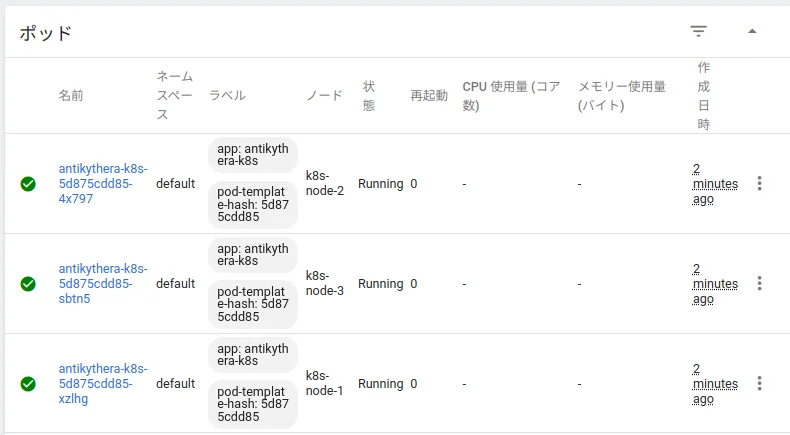
- ホスト名でもつなぎたい. PodのDNSについて